Integrate SoftNAS with IDrive® e2
SoftNAS by Buurst is a software-defined virtual NAS appliance that runs in public clouds and on-prem hypervisors, delivering shared NFS, SMB, and iSCSI storage with features such as caching, snapshots, deduplication, compression, and replication. It aggregates cloud and local disks, as well as object storage, to support hybrid storage workflows, backup, disaster recovery, and cloud file services. Integrating SoftNAS with IDrive® e2 provides a capable, scalable cloud object storage foundation for efficient, secure, and cost-aware data storage and access.
Prerequisites
Before you begin, ensure the following:
- An active IDrive® e2 account. Sign up here if you do not have one.
- A bucket in IDrive® e2. See how to create a bucket.
- Valid Access Key ID and Secret Access Key. Learn how to create an access key.
Configure SoftNAS with IDrive® e2
The following instructions and config guidelines can help you configure SoftNAS with IDrive® e2. To add a Self-Configured Cloud Disk Extender, follow the steps below.
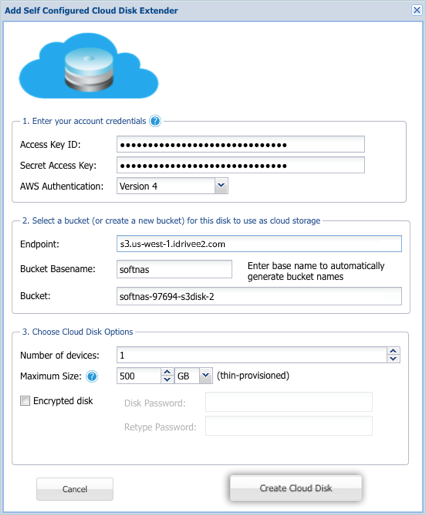
- Enter your account credentials.
- Enter your IDrive® e2 Access key as Access Key ID.
- Enter your IDrive® e2 Secret key as Secret Access key.
- Set AWS Authentication as Version 4.
- Select a bucket (or create a new bucket) for this disk to use as cloud storage.
- Enter your IDrive® e2 Endpoint as Endpoint.
- Enter your IDrive® e2 Bucket name as Bucket Basename.
- Under Bucket, choose your preferred IDrive® e2 bucket or have SoftNas generate it for you.
- Choose Cloud Disk Options.
- The Number of devices is set to 1.
- Set Maximum Size as per your requirement.
- Once done, click Create Cloud Disk.