Integrate SISCIN with IDrive® e2
SISCIN (ComplyKEY SISCIN) is a file analysis, archiving, and compliance platform that manages unstructured data across enterprise file servers. It identifies data ownership, detects ROT content, and applies policy-based archiving and retention to move cold data while supporting compliance and eDiscovery. Integrating SISCIN with IDrive® e2 provides a capable, scalable cloud object storage foundation that enables systematic integration for secure, efficient, and cost-effective data archiving and retention.
Prerequisites
Before you begin, ensure the following:
- An active IDrive® e2 account. Sign up here if you do not have one.
- A bucket in IDrive® e2. See how to create a bucket.
- Valid Access Key ID and Secret Access Key. Learn how to create an access key.
- The SISCIN application is installed and configured on your machine.
Configure SISCIN with IDrive® e2
- Log in to the SISCIN Portal.
- Under your username, select Configuration and then click Archives.
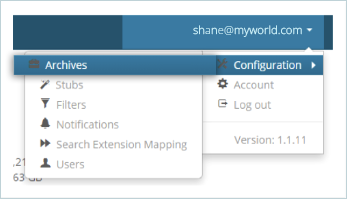
- Click + Create an Archive.

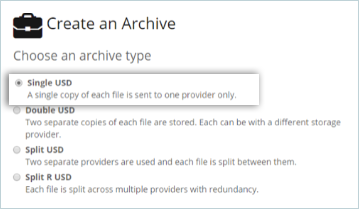
- Select the type of archive you want to create. The majority of our clients use the Single USD.
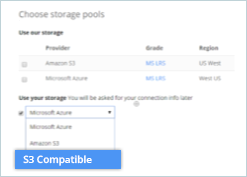
- Under the Choose storage pools section, go to Use your storage and select S3 Compatible from the dropdown. Click Next to Create an Archive.
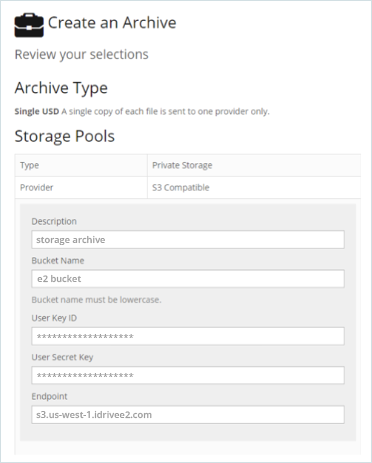
- Provide the following information:
- Enter a Description for your Archive.
- Enter your IDrive® e2 bucket as Bucket Name.
- Enter your IDrive® e2 Access key as User Key ID.
- Enter your IDrive® e2 Secret key as User Secret Key.
- Enter your IDrive® e2 Endpoint as Endpoint.
- Give your Archive a name.
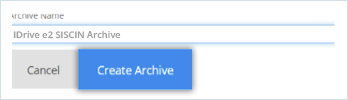
- Click Create Archive, and SISCIN will create your SISCIN Archive using IDrive® e2 storage.

Note: The data restoration process is managed by your backup software, which helps recover lost or compromised data. Each computing environment is unique, and factors such as data type, software settings, and system performance can impact the restoration process. If you encounter issues or have application-specific questions, please contact the technical support team for your backup software for expert assistance.