Mass deletion of Delete Markers in IDrive® e2 Bucket
Buckets with S3 versioning can build up many Delete Markers over time. These markers are included in LIST operations along with current and noncurrent objects. A large number of markers forces the system to scan more entries per query, which slows response times. Mass deletion of Delete Markers in your IDrive® e2 buckets helps you reduce this overhead and improve LIST performance.
Prerequisites
Before you begin, ensure the following:
- An active IDrive® e2 account. Sign up here if you do not have one.
- A bucket in IDrive® e2. Learn how to create a bucket.
- Valid Access Key ID and Secret Access Key. Learn how to create an access key.
- The latest version of AWS SDK boto3 installed for Python on your CLI.
- Python 3+ installed to run this script.
The following steps can help you with the mass deletion of Delete Markers in IDrive® e2 Bucket.
Configure Profile for IDrive® e2
- Configure your Profile to save your IDrive® e2 credentials.
$ aws configure --profile idrivee2AWS Access Key ID [****************OuzN]: <Enter your IDrive e2 Access Key>AWS Secret Access Key [****************gE66]: <Enter your IDrive e2 Secret Access Key>Default region name [us-central-1]: <Enter region code>Default output format [json]: <json>
Your credentials have now been saved with your profile name.
Execute a script and verify the output
Click here to download the IDrive® e2 Delete Marker Tool Script.
- Open a terminal and execute the script using Python.
Ex: python3 idrive_e2_delete_marker_tool.py - Once the script runs, it will prompt you to select a profile or enter the admin's API keys.
$ Press 1 and enter to select existing profile
$ Press 2 and enter to enter Access Key and Secret Key
$ Press 3 to exit:- If you already have a profile configured on your CLI, you may press 1. You can configure the AWS CLI profile for the IDrive® e2 account by following the steps in the previous step.
- If you do not wish to use the existing profile, you may press 2 and enter your API Keys.
- It will prompt you to select an option from the menu to run. Select option 2 to delete all delete markers in that bucket.
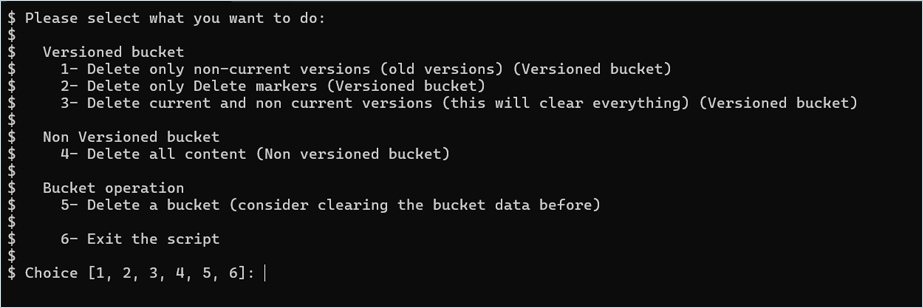
- Enter your bucket name where you want to clear the delete marker. (The region of the bucket will be automatically detected.)
NOTE: If you are specifying a prefix, please be sure to enter the FULL PREFIX PATH (bucket name NOT included).$ Please enter the name of the bucket: - Before deletion begins, the script will perform a full pagination of your bucket and show you the following.
- Total Number of Delete-Markers that will be deleted
- Total Number of Current Objects which will NOT be deleted
- Total Number of Non-Current Objects which will NOT be deleted
- Each log entry will represent the deletion of 1000 DMs at a time
In this example, we have set the profile name as "idrivee2" in the "~/.aws/credentials" file.
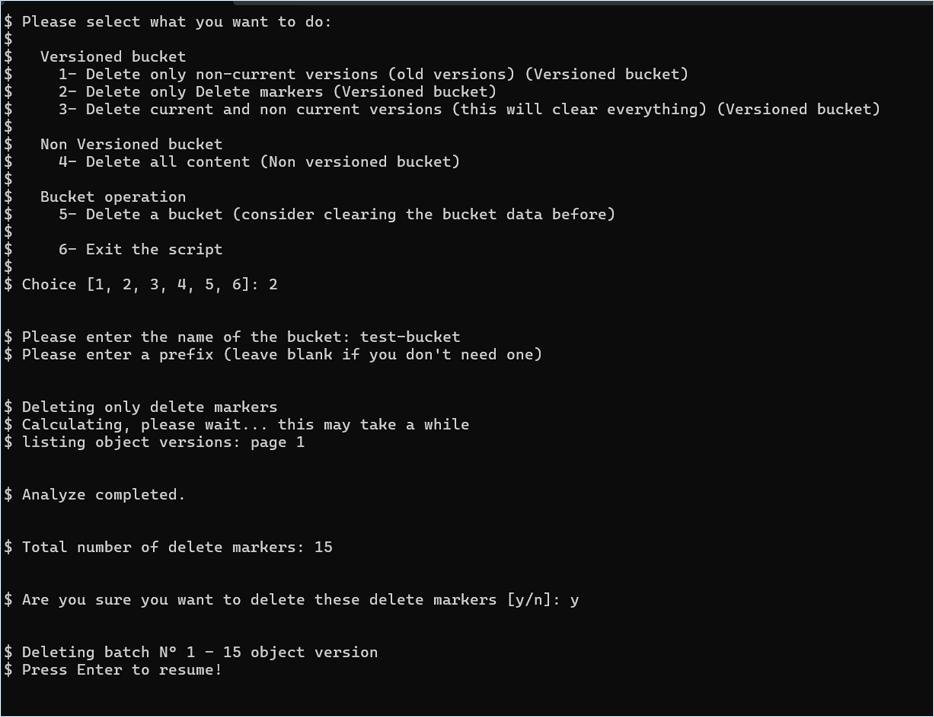
$ Available Profiles: ['idrivee2']$ Profile name: idrivee2The script output after successful execution is shown below.
$ Please select what you want to do:$$   Versioned bucket$    1- Delete only non-current versions (old versions) (Versioned bucket)$    2- Delete only Delete markers (Versioned bucket)$    3- Delete current and non current versions (this will clear everything) (Versioned bucket)$$   Non Versioned bucket$    4- Delete all content (Non versioned bucket)$$   Bucket operation$    5- Delete a bucket (consider clearing the bucket data before)$$    6- Exit the script$$ Choice [1, 2, 3, 4, 5, 6]: 2
                              $ Please enter the name of the bucket: test-bucket$ Please enter a prefix (leave blank if you don't need one)
                           $ Deleting only delete markers$ Calculating, please wait... this may take a while$ listing object versions: page 1
                        $ Analyze completed.
                     $ Total number of delete markers: 15
                  $ Are you sure you want to delete these delete markers [y/n]: y
               $ Deleting batch N° 1 - 15 object version$ Press Enter to resume!
            The script is also attached to this KB document.
Output screenshot
Try with s3undelete
You may also use the s3undelete utility to delete Delete-Markers (DMs). This utility is macOS and Windows-compatible.
The Download Packages based on your requirement are as follows.
- For Windows: s3undelete.exe
- For macOS: s3undelete.pkg
Configuration
To use s3undelete, set 2 environment variables, AWS_ACCESS_KEY and AWS_SECRET_KEY, to your S3 access key ID and secret access key, respectively.Outputs:
- List Delete Markers:
s3undelete list <e2-region code> https://<your idrive e2 endpoint>/<your-idrive-e2-bucket> - Removing Delete-Marker(s):
s3undelete undelete <e2-region code> https://<your idrive e2 endpoint>/<your-idrive-e2-bucket>