Integrate Weka.io with IDrive® e2
Weka.io is a Campbell, California-based data platform provider delivering NeuralMesh, a software-defined architecture built for AI, machine learning, and large-scale parallel workloads. The platform delivers extreme throughput, low latency, and exabyte-scale performance through a containerized microservices design that removes data silos and accelerates model training and agentic AI pipelines. Integrating Weka.io with IDrive® e2 provides a scalable cloud object storage solution that effortlessly extends Weka environments with cost-efficient, S3-compatible storage for durable data persistence and hybrid workflows.
Prerequisites:
Before you begin, ensure the following:
- An active IDrive® e2 account. Sign up here if you do not have one.
- A bucket in IDrive® e2. Learn how to create a bucket.
- Valid Access Key ID and Secret Access Key. Learn how to create an access key.
- WEKA cluster up and running.
- WEKA GUI access (admin login).
- Internet access from WEKA nodes to IDrive® e2 endpoint (IDrive® e2 is S3-compatible object storage, so WEKA treats it as an S3 backend).
Configure Weka.io with IDrive® e2
The following steps can help you configure Weka.io with IDrive® e2 by accessing the WEKA GUI.
- Open any web browser.
- Enter the WEKA cluster IP or hostname: https://<weka-management-IP>
- Log in using your WEKA admin credentials (If HTTPS certificate warnings appear, it is normal for self-signed certificates to help you proceed safely to the next steps).
- In the left menu, go to Cluster → Object Stores.
- Click Add Object Store.
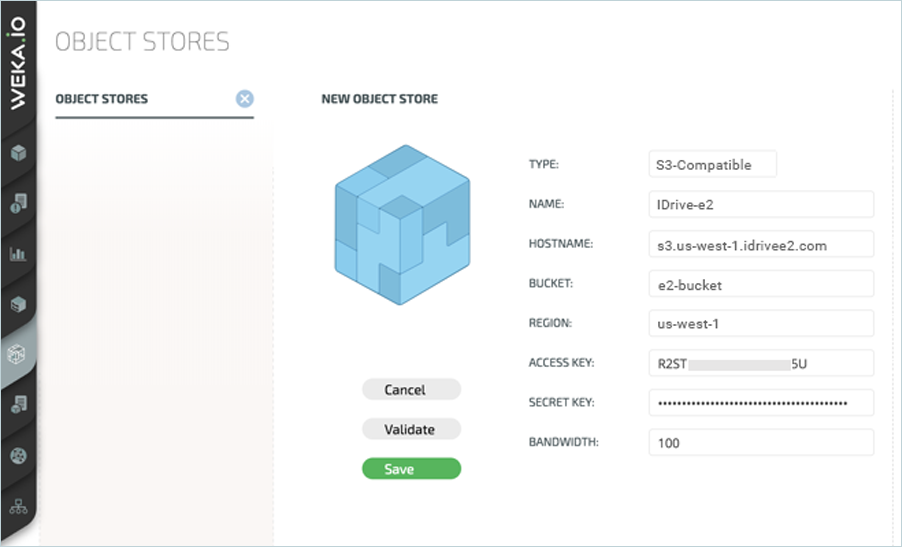
- Choose S3-Compatible.
- Name: idrive-e2
- Enter your IDrive® e2 endpoint URL as Host Name.
- Enter the Bucket name in the Bucket field.
- Enter the Region. (For example: us-west-1)
- Enter your IDrive® e2 access Key.
- Enter your IDrive® e2 Secret Key.
Click Validate, then click Save to save the settings.