Integrate TNTDrive with IDrive® e2
TNTDrive is a Windows-based utility that mounts Amazon S3-compatible cloud storage, including AWS and other providers, as virtual local drives within Windows Explorer. It supports secure SSL and TLS connections, compression, caching, parallel transfers, storage-class access, and command-line automation for streamlined cloud data management. Integrating TNTDrive with IDrive® e2 provides a capable, scalable cloud object storage solution that effortlessly bridges S3-based object storage with familiar drive-level access for secure, efficient workflows.
Prerequisites
Before you begin, ensure the following:
- An active IDrive® e2 account. Sign up here if you do not have one.
- A bucket in IDrive® e2. Learn how to create a bucket.
- Valid Access Key ID and Secret Access Key. Learn how to create an access key.
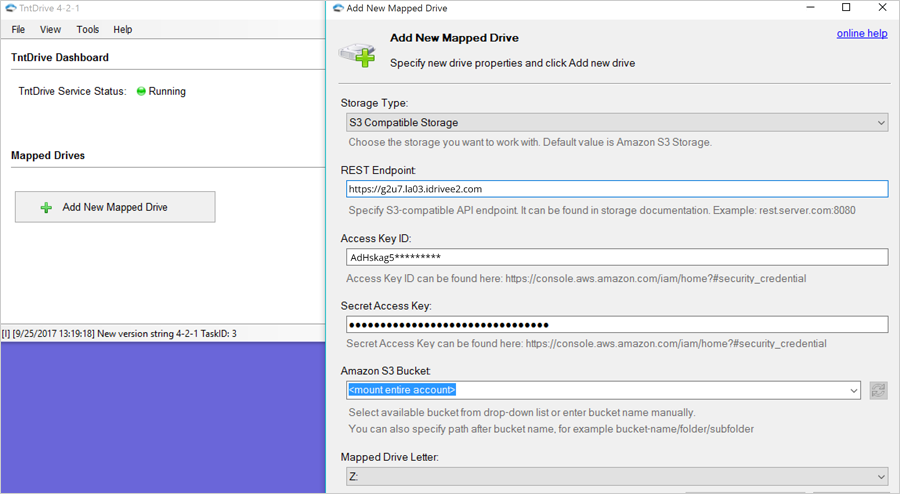
TNTDrive is certified for use with IDrive® e2. To successfully configure TNTDrive with IDrive® e2, please enter the details on the screen below.
Configure TNTDrive with IDrive® e2
- Download and install the TNTDrive app. https://tntdrive.com/
- Once the app opens, click Accounts in the top menu bar.
- Click Add new account.
- Under Account Name, enter your desired name (e.g., IDrive® e2).
- From the Storage Type dropdown, choose Amazon S3 Compatible Storage.
- In the REST Endpoint field, enter your IDrive® e2 S3 Endpoint as the Server Endpoint.
- Enter your IDrive® e2 Access key as the Access Key ID.
- Enter your IDrive® e2 Secret key as the Secret key.
- Select the Use secure transfer (SSL/TLS) option.