Integrate StableBit CloudDrive with IDrive® e2
StableBit CloudDrive is a software solution that lets users mount cloud storage as a local disk on Windows systems. It stores files in cloud object storage while presenting them as a standard drive for seamless access and management. StableBit CloudDrive includes features like caching, encryption, and data redundancy to improve performance and reliability. When integrated with IDrive® e2 S3-compatible object storage, it provides secure, scalable, and cost-effective cloud storage, enabling businesses to expand storage capacity while ensuring reliable data protection and easy file access.
Prerequisites
Before you begin, ensure the following:
- An active IDrive® e2 account. Sign up here if you do not have one.
- A bucket in IDrive® e2. Learn how to create a bucket.
- Valid Access Key ID and Secret Access Key. Learn how to create an access key.
- The appropriate IDrive® e2 endpoint URL:
- s3.us-east-1.idrivee2.com (for US East 1)
- s3.us-west-1.idrivee2.com (for US West 1)
Configure StableBit Cloud Drive with IDrive® e2 using AWS S3
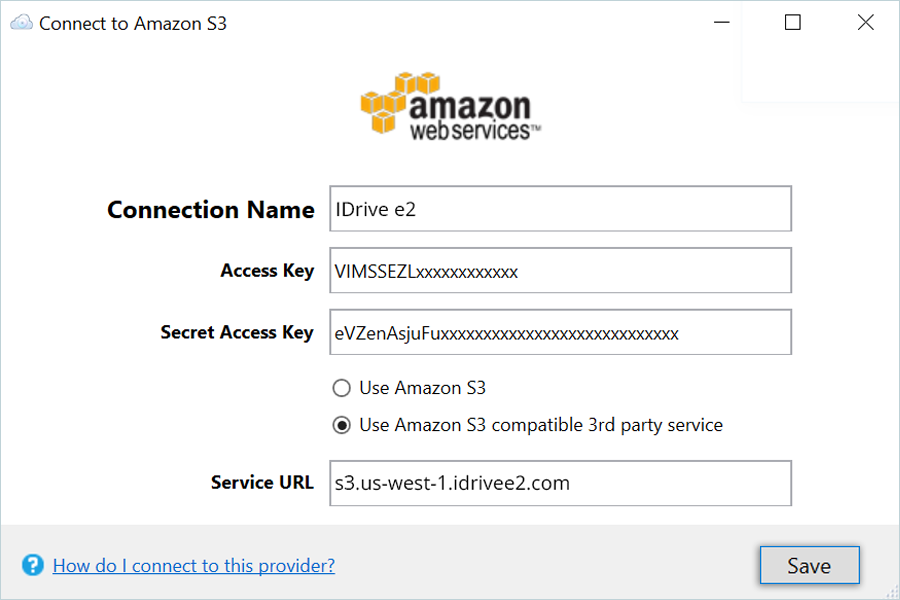
While configuring the drive in StableBit CloudDrive, select Amazon S3. Then choose the S3 Compatible option and enter the following details.
- Enter IDrive® e2 as the Connection Name.
- Enter your IDrive® e2 Access Key in the Access Key field.
- Enter your IDrive® e2 Secret Key in the Secret Access Key field.
- Select Use Amazon S3 compatible 3rd party service.
- Enter the IDrive® e2 endpoint as the Service URL.
- Click Save in the bottom-right corner to apply the settings.