Related Links
Integrate Spectra StorCycle with IDrive® e2
Spectra StorCycle is a data lifecycle management platform designed to manage, archive, and move large volumes of unstructured data across storage tiers. It automates data migration from primary storage to lower-cost storage or cloud object storage based on policies. StorCycle helps organizations optimize storage costs, improve data visibility, and simplify long-term data retention. When integrated with IDrive® e2 S3-compatible object storage, it enables secure, scalable, and cost-effective cloud storage for archiving and long-term data retention while maintaining reliable access to stored data.
Prerequisites
Before you begin, ensure the following:
- An active IDrive® e2 account. Sign up here if you do not have one.
- A bucket in IDrive® e2. Learn how to create a bucket.
- Valid Access Key ID and Secret Access Key. Learn how to create an access key.
- IDrive® e2 S3 endpoint for StorCycle configuration (e.g., s3.us-west-1.idrivee2.com)
Note: This configuration example uses the IDrive® e2 us-west-1 storage region. To use other regions, refer to the appropriate IDrive® e2 service URLs listed here:
https://www.idrive.com/s3-storage-e2/e2-endpoint-urls.
Configure Spectra Storcycle with IDrive® e2
- In the StorCycle console, click the gear icon and select Storage to open the storage configuration page.
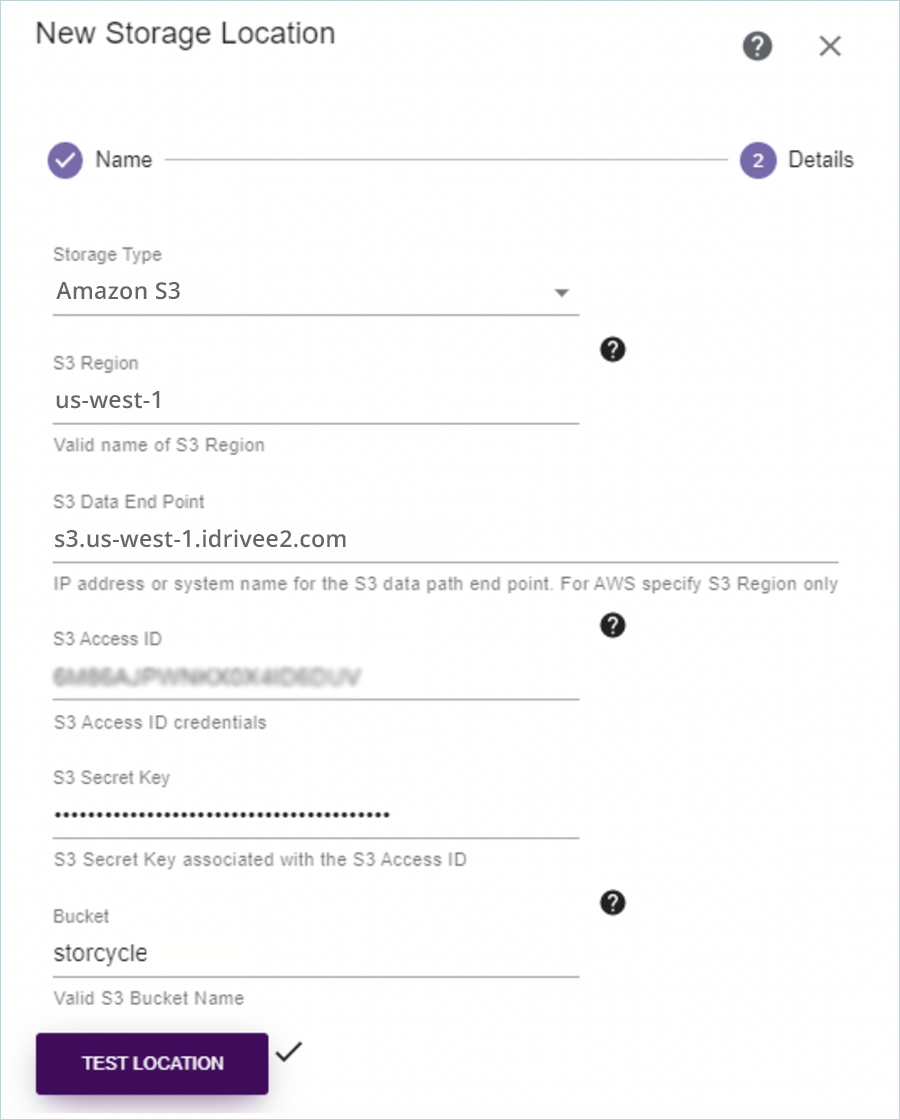
- Click New Storage Target to start the configuration wizard, then enter the following details:
- Select Amazon S3 as the Storage Type.
- Enter your IDrive® e2 region in S3 Region.
- Enter the IDrive® e2 endpoint in S3 Data Endpoint.
- Provide your IDrive® e2 Access Key as S3 Access ID.
- Provide your IDrive® e2 Secret Key as S3 Secret Key.
- Enter your IDrive® e2 bucket name in Bucket.
- Click Test Location to verify the configuration. A green checkmark confirms that the IDrive® e2 bucket has been successfully configured as a storage location in StorCycle.