Archive Cleanup
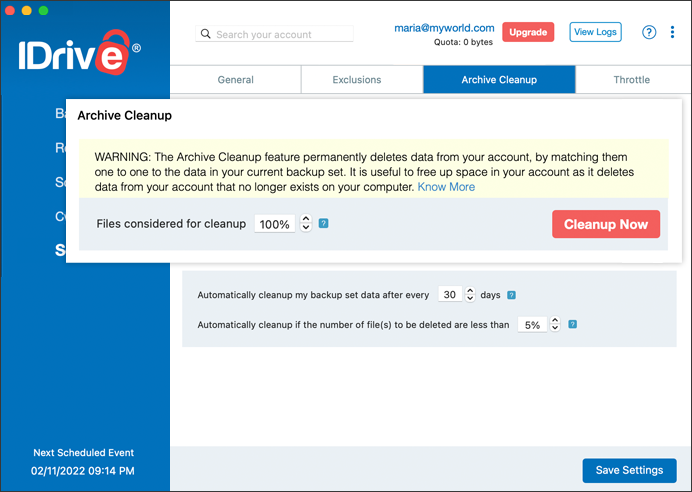
The Archive Cleanup feature lets you make a one to one match of the local data in the backup set of your Mac to your account. It is useful to free up space in your account as it deletes data from your account that no longer exists on your computer.
To run Archive Cleanup,
- Go to Settings tab and click Archive Cleanup.
- Specify the percentage of files to be considered for backup and click Cleanup Now.
IDrive will generate a list of items to be deleted from your account.
- Click Delete, to delete the files permanently from your account.
Alternatively, you can set up periodic automated cleanup by enabling Periodic Cleanup by using the check box. Set the number of days and percentage of data to be considered for cleanup.
Note:
- Archive Cleanup has controls to avoid inadvertent data deletion. For 'Cleanup Now' it by default considers up to 25% of files for deletion. You can also regulate the percentage according to your preference.
- Archive Cleanup permanently deletes data which no longer exists on your computer to free up space in your account. Users will need to delete empty folders manually in order to remove them from the account.
- Periodic Cleanup may result in automatic deletion of data from your IDrive account, use/set this option carefully.
- The percentage mention refers to files considered for deletion in your account as a percentage of total number of files. The purpose of this percentage based control is to avoid large deletion of files in your account due to some unforeseen event on your computer.