IDrive® Snapshots for Ransomware Protection
Your best defense against ransomware!
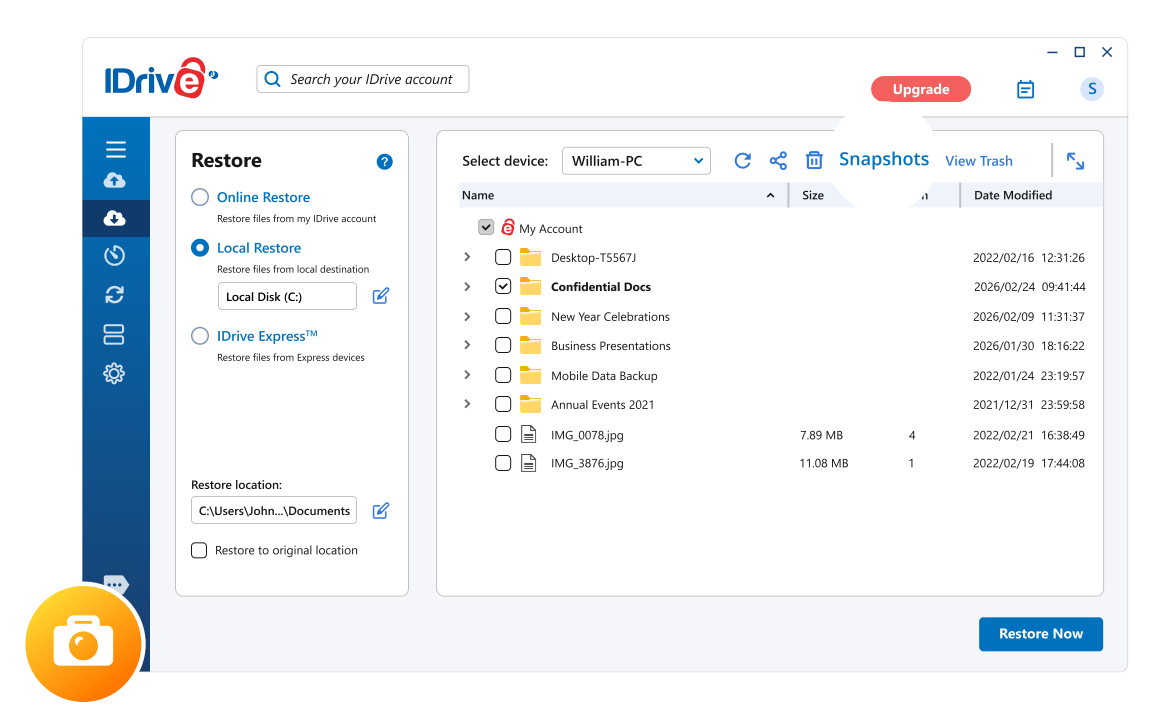
Are you protected against ransomware?
Ransomware threats are more sophisticated than ever, and traditional antivirus tools can’t always stop them. Once your files are encrypted, you risk losing access permanently—even if you pay the ransom. With IDrive® Snapshots, you can perform a snapshot-based restore and roll back to a clean, safe version of your data from before the attack. This ensures fast ransomware recovery and keeps your files protected.

Snapshots give you a historical view of your data stored in your IDrive account, allowing easy point-in-time recovery. If your systems are compromised by ransomware or other malicious software, you can quickly restore files to an earlier, unaffected version.
Because IDrive supports Windows, Mac, and Linux systems, you can safeguard all your devices with one account. Plus, snapshot storage does not count against your plan’s quota—so you get enhanced data protection without extra cost.
Snapshots are powered by IDrive’s file versioning feature. You can go back and restore up to 30 previous versions of your files. How far you can roll back depends on the oldest available version in your account.
(For accounts created before Nov 7, 2018, up to 10 versions are available.)
Restoring files with snapshots is quick and simple:
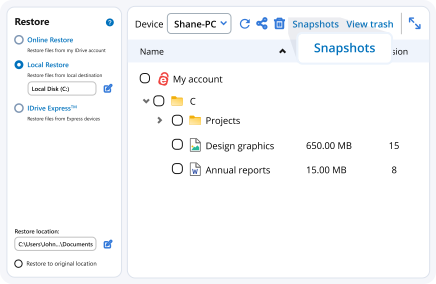
Open the Restore tab in your IDrive application and click Snapshots.
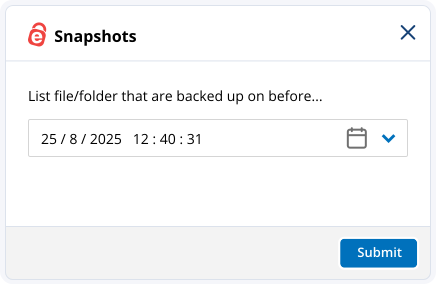
Select the date and time for your point-in-time recovery and click Submit to view your files as they existed then.
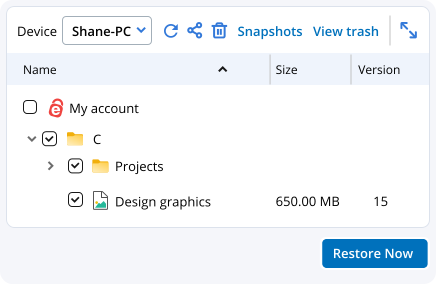
Choose the files or folders you want and click Restore Now to complete the process.
Snapshot-based restore allows you to recover files and folders from a specific point in time. With IDrive Snapshots, you can restore a clean version of your data from before a ransomware attack, accidental deletion, or unwanted file changes.
If ransomware encrypts your backed-up files, IDrive Snapshots lets you roll back to an earlier version of your data. Simply select a snapshot created before the infection and restore your files to quickly recover from the attack.
No. The additional storage required for snapshots does not impact your allocated IDrive backup storage, giving you an extra layer of protection without consuming your backup quota.
IDrive currently supports up to 30 file versions for most accounts. The available recovery period depends on the age of the oldest version stored in your account.
Yes. IDrive Snapshots supports point-in-time recovery, allowing you to restore files and folders to an earlier state before they were deleted, modified, corrupted, or encrypted.
Regular backups protect your data, while snapshots provide historical recovery points. Together, they deliver stronger protection against ransomware, file corruption, accidental changes, and other data loss events.
- Note:
- * The Snapshots feature is supported for most accounts, starting 07/04/2017.
- ** Version limits have changed for IDrive. Currently, you can restore 30 versions of the backup files. For accounts created prior to 11/07/2018, you can restore up to 10 versions.