Your files and folders are transferred using 128-bit SSL (Secure Socket Layer) technology - the industry standard encryption for data transmission, between the IDrive application and servers.
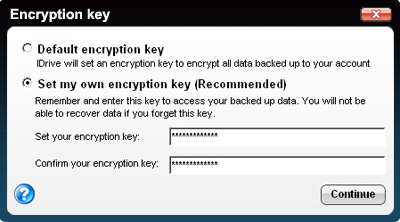
Data stored at our world-class data centers is encrypted using the encryption key (known only to you in case you set the private encryption key). IDrive uses industry standard 256-bit AES encryption on storage - ideal for higher security needs of Financial, Healthcare and Government organizations.
WARNING: IDrive does not store your private encryption key on its servers. It is recommended that you archive it safely to backup and restore your data. However, if you opt for the Default encryption key, you need not remember it.
What is the CleanUp feature and how does it work?
CleanUp is a useful option if you have removed files and folders from your computer and wish to do the same from your IDrive account.
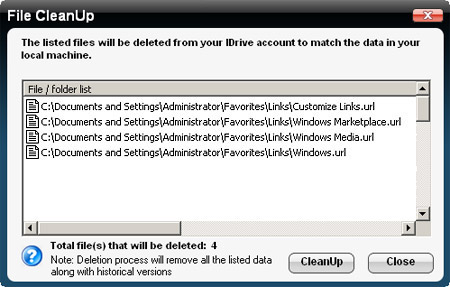
To cleanup data, select the folder(s) / drive(s) in your online account that you wish to bring in-line with your computer. Select 'Tools' from the menu and click on the 'Cleanup' option. Files deleted from your local computer but available in your IDrive account, are listed. Click 'CleanUp' to remove them.
Can I restore my data till a particular date and time?
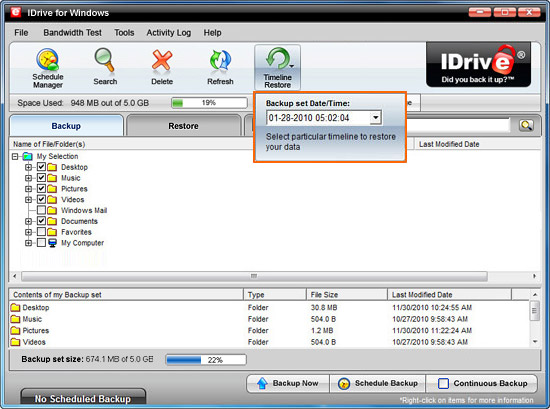
Yes. Using the 'Timeline Restore' option on the application tool bar, you can restore your Backup set(s) till a particular date and time. Data backed up till the chosen date and time is displayed on the 'Restore' tab under 'My IDrive'. You can select the files and folders that you wish to restore to your local computer.
What is the Family Pack Plan?
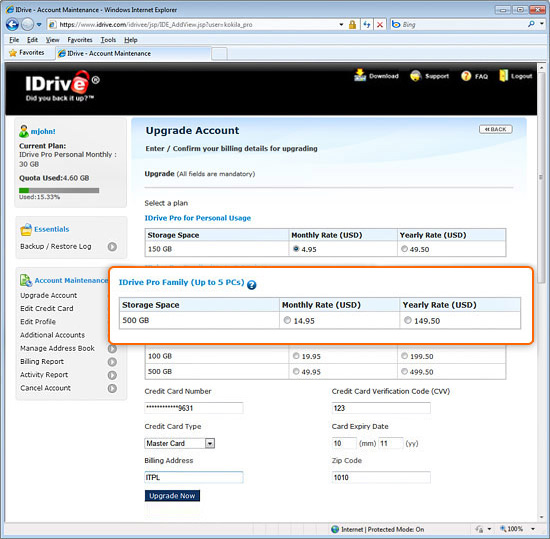
The Family Pack Plan is especially useful if you are backing up multiple computers to a single IDrive account. All you need to do is setup the IDrive client with the same Encryption Key on computers you wish to backup to a single IDrive account. Further, even though this plan allows you to backup up to 500 GB of data to this single account, there are no restrictions to the amount of data backed up from individual computers within this 500 GB, putting you in control of your 'backup data per PC' needs.
Example: You might have a PC with pictures and about 50 GB of data to backup while another PC storing important data files might have 300 GB of data. By this convenient option, you can backup both of these PCs to a single Family Pack account facilitating better data management.
Note: You cannot backup both PCs and Macs under a single Family Pack account.